Native applications for Android and iOS bring the complete Helabet experience to your smartphone. Download the app to place live bets on PSL fixtures, spin slot machines from Pragmatic Play, and withdraw winnings directly to your Capitec account—all without opening a browser.
The Android APK weighs under 50MB and installs in under two minutes. iOS users access the app through the official App Store with automatic updates enabled by default. Both versions support biometric login via fingerprint or Face ID for faster account access.
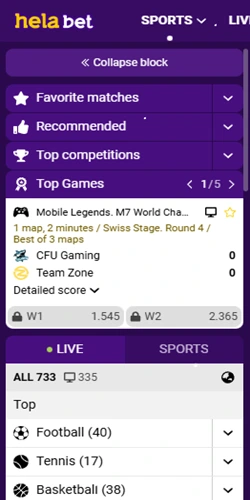
Mobile applications deliver performance advantages over browser-based betting. Push notifications alert you when your accumulator settles or when PSL matches enter injury time with goals expected. The app caches your recent bets locally, so you can review your betting history even with unstable connectivity—useful in Johannesburg traffic or Cape Town stadiums.
Data consumption remains minimal. A standard betting session—checking odds, placing three accumulators, and reviewing results—consumes approximately 8-12MB. Live streaming of football matches uses 150-200MB per hour at standard quality. The app compresses images and preloads essential interface elements during WiFi connection to reduce mobile data usage during actual betting.
Pre-saved bet amounts and favorite markets enable single-tap wagers. Bet slip remembers your typical stake values; accumulators build faster with quick-add functionality for multiple selections.
Configure push notifications for specific teams or leagues. Get instant alerts when Orlando Pirates scores, when odds shift dramatically, or when cashout becomes available for your active bets.
Fingerprint and Face ID authentication replace password entry. Two-factor authentication syncs across devices; security settings migrate automatically when upgrading to a new phone.
Capitec Pay and Ozow launch directly from the app without browser redirects. Deposit history displays in-app; withdrawal requests submit with three taps from the banking tab.
2000+ slots, live dealer tables, and crash games load within the app. Evolution live casino streams in HD; game filters sort by provider, RTP, or volatility for quick discovery.
Built-in match tracker shows possession percentages, corner counts, and card statistics. Live betting odds update every 3-5 seconds; visual timeline indicates key match events as they happen.
Android users must download the APK file directly from the Helabet website since Google Play Store doesn't list gambling apps for South African users. The process takes about three minutes from start to finish.
If installation fails, verify your Android version is 5.0 or higher and that you have at least 200MB free storage. Some Huawei devices require additional permissions in AppGallery settings; Samsung phones may display a "Play Protect" warning which you can safely bypass for the official Helabet APK.
iPhone and iPad users enjoy a simplified installation through Apple's App Store. The app requires iOS 12.0 or later and approximately 85MB of storage space.
The iOS version updates automatically when new releases become available—you'll find update notifications in the App Store Updates tab. Manual updates take 15-30 seconds and don't require re-entering your login details.
While the mobile website functions adequately, the dedicated apps provide measurable performance improvements and exclusive features unavailable through browser access.
| Feature | Mobile App | Mobile Browser |
|---|---|---|
| Average Loading Speed | 1.2 seconds | 3.5-4.8 seconds |
| Push Notifications | Yes, customizable | Not available |
| Offline Bet History | Cached locally | Requires connection |
| Biometric Login | Fingerprint & Face ID | Password only |
| Data Usage (per session) | 8-12MB | 15-22MB |
| Payment Integration | Direct in-app | Browser redirects |
| Live Streaming Quality | Up to 1080p HD | 720p maximum |
| Bet Slip Auto-Save | Yes, persistent | Session-based only |
The app maintains your logged-in session indefinitely unless you manually sign out, whereas browser sessions expire after 24-48 hours of inactivity. This means fewer login interruptions during multi-day betting strategies on tournaments like the Africa Cup of Nations.
Both Android and iOS versions support older devices, though performance scales with hardware capabilities. Minimum specifications ensure the app runs; recommended specs deliver optimal experience.
Minimum: Android 5.0 (Lollipop), 2GB RAM, 200MB free storage. Recommended: Android 8.0+, 4GB RAM, 500MB storage. The app functions on Samsung, Huawei, Xiaomi, Oppo, and other manufacturers. Screen resolution adapts from 480x800 to 1440x3200 pixels; tablets with 7-10 inch displays supported.
Minimum: iOS 12.0, iPhone 6 or newer, iPad Air 2 or newer, 200MB storage. Recommended: iOS 15.0+, iPhone X or later models, 500MB storage. The app scales appropriately for iPhone SE compact screens through iPhone 14 Pro Max large displays. iPad optimization provides split-view betting alongside live match viewing.
Minimum connection: 3G with 1Mbps download speed for basic betting. Recommended: 4G LTE or WiFi with 5Mbps+ for live streaming and rapid odds updates. The app operates on Vodacom, MTN, Cell C, and Telkom mobile networks throughout South Africa—including rural areas with limited connectivity.


